The search for the best IPTV USA option can return hundreds of services and bold promises. A useful IPTV service comparison should focus on what is actually available at your address, whether the distributor is authorized to provide the content, which devices work with it and what the full subscription costs. High channel counts and attractive graphics are not enough to judge a service. To compare the best IPTV USA candidates fairly, use the same checklist for every provider.
This guide covers the practical questions to ask before you subscribe to an internet television provider in the United States, whether you primarily watch local news, on-demand entertainment or live sports.

Decide what you need from an IPTV service
Write down the channels and programmes that matter most to your household. Local affiliates, national news, international programming, children’s content, movies and sports are different needs, and no single service should be assumed to cover all of them. Ask whether the package lists the exact channels you want and whether those channels are available in your market.
Also separate a subscription service from an IPTV player app. The app may provide a place to enter authorized playlist details or credentials, but installing a player does not supply television rights or a subscription. Check which part of the setup the provider actually supplies.
Verify local channels and sports rights
Local station availability can matter if you rely on regional news, weather or local programming. Sports coverage can be more complicated: a league, event, broadcaster and region may each have different rights arrangements, and blackouts or local restrictions may apply. Ask about the exact event and current season instead of relying on broad phrases such as “all live sports.”
A provider should be able to explain its authorization to distribute the content it advertises. Avoid offers that promise every premium channel and every pay-per-view event for an implausibly low price without listing the source of its rights. The IPTV protocol describes how video is delivered; it does not prove that a particular service is authorized.
Understand the true subscription price
Compare the total charge for the same period, including sales tax where applicable, payment fees, activation charges, additional connections and renewal costs. Determine whether the advertised monthly price is actually billed each month or calculated from a longer prepaid plan. Read trial, cancellation and refund conditions before entering payment details.
Greadia’s pricing page currently presents plans in euros. US customers should confirm the final transaction currency, any conversion or card fees, applicable tax and current availability for their location before ordering. Do not assume a price shown in another currency is the amount that will appear on your statement.
Check devices, apps and simultaneous connections
Common viewing setups include smart TVs, Fire TV devices, Android TV boxes, Apple TV, streaming sticks, phones, tablets and computers. Support can vary by model and operating-system version, so ask for the exact compatible app and documented setup process. Use official app stores when available and be cautious about unexplained downloads.

If family members watch on multiple screens, confirm the included number of simultaneous streams and whether additional connections cost extra. A service may support a device but still limit the number of streams or the content available through a particular app.
Review video quality and home network needs
HD, Full HD and 4K are useful specifications, but actual playback depends on the source feed, app, hardware, home network and available bandwidth. A crowded Wi-Fi network or an older streaming box can create problems even when a speed test looks good. Test the connection in the room where you watch and use Ethernet where practical.
No honest provider can promise identical playback on every device and network. Look for clear recommended requirements and realistic troubleshooting help. If a service claims “no buffering,” ask what support is available when your own connection or a stream has a problem.
Check privacy, account security and customer support
Before subscribing, review the privacy policy and learn what account information is collected, how payment is handled and how to contact support. Avoid sharing passwords for unrelated streaming accounts, and do not install remote-access tools merely because an unknown seller requests them. Keep invoices and a copy of the offer and terms.
Support should be able to answer specific questions about channels, device compatibility, activation and billing. Greadia advertises 24/7 assistance. If you are considering Greadia, ask support to confirm the exact package details and compatibility for your device and market before paying.
A consistent way to compare IPTV providers
Make a short list and score each option against the same points: content rights, exact channel list, local availability, sports rights, supported devices, total cost, renewal rules, refund process, privacy and response quality. Treat independent user reviews as one input rather than definitive proof. Look for detailed experiences that match your device, location and intended use. A best IPTV USA service should remain on your shortlist only after its content rights, local availability and subscription terms have been checked. A structured best IPTV USA comparison makes it easier to explain why one plan fits your needs better than another.
For a closer look at Greadia, review the published pricing plans, check the FAQ and ask support to verify current content, terms and device compatibility. A provider should welcome specific questions before a purchase. Your best IPTV USA option depends on the exact channels you need, the devices in your home and the written terms—not on a ranking alone.
Define the channels and local-market features you need
The United States is not one uniform television market. Viewers may care about local news, weather, local affiliates, regional sports, national networks, Spanish-language channels or international programming. Write down your location and the specific channels or shows you need before comparing IPTV providers. A plan advertised as “USA IPTV” may still differ in its local feeds, regional availability and package conditions.
Sort your requirements into must-have, useful and optional. Include the time of day you normally watch, whether you need a programme guide, catch-up features, subtitles or simultaneous streams. This makes it easier to evaluate a package on everyday use rather than a long list of channel logos or a headline count that may include content you never watch.
For households split across locations, check the service’s rules for travel, out-of-home access and concurrent streams. Some plans limit simultaneous playback, have activation restrictions or require a primary location. Clarifying these details in advance helps avoid an arrangement that looks inexpensive but does not match how your family watches.
Local channels and regional sports require exact confirmation
Local broadcasting can be a decisive factor. Ask which local affiliate or regional feed is included for your area, how the programme guide reflects local time and how channel changes are communicated. Do not assume the name of a major network guarantees the correct local station or the availability of all local programming.
Sports rights are commonly divided by league, competition, event and territory. Regional restrictions or blackout conditions may apply, and a package label such as “all sports” does not identify which events are authorised for your location. Confirm the specific game or event, date, channel and any separate subscription requirement before you pay.
If you plan around live events, keep an authorised backup where needed. Streams can be affected by source availability, device performance and local broadband conditions even when the event is included. A sensible provider should explain supported access and current availability without guaranteeing that every future event will always be present.
Understand the difference between a service, an app and a streaming box
An IPTV service supplies access under its own terms; an IPTV player is software used to display a compatible source; and a streaming box is the device connected to the television. These products solve different problems. Installing an app does not itself provide channel access, and purchasing a box does not mean a paid programme catalogue is included.
Before choosing hardware, confirm the operating system, memory, available storage, update support, HDMI compatibility and the video formats your household needs. An inexpensive older device may open an app but struggle with newer versions or high-resolution playback. Make sure the exact device model is supported rather than relying on the broad label “Android TV” or “smart TV”.
Use official app stores and verified installation instructions where possible. Treat requests to disable device security, sideload an unknown package or share third-party passwords as warning signs. Ask the provider whether the app requires a separate purchase and what happens if an app is removed or becomes incompatible after a system update.
Measure home-network quality at the television
The quality of an internet stream depends on the source, service, ISP route, router, Wi-Fi environment and player. A speed test on a phone beside the router may not reflect the connection in a bedroom or media cabinet. Test on the television or streamer at the time you normally watch, and repeat the test while other household devices are active.
Try Ethernet for a fixed device when practical. If the wired result is stable but Wi-Fi is not, assess router placement, walls, interference and the wireless band. Restarting equipment can help with some issues, but repeatedly restarting without recording the result makes diagnosis harder. Change one thing at a time and note the effect.
Higher resolution typically needs more sustained bandwidth and compatible source material. Check the provider’s actual recommendations and leave room for video calls, games, cloud backups and other screens. A “4K” label can describe support rather than every item being delivered in native 4K, so verify the specific content and device capabilities.

Calculate price, taxes and recurring-billing risk
Compare equivalent billing periods and write down the total charge, tax, transaction fees, renewal price, currency, cancellation steps and access expiry date. A monthly equivalent on an annual package is not the same as paying month to month. Include the cost of hardware, any separate player licence and any third-party app subscription needed for features you want.
Greadia’s current packages are displayed in euros, so US customers should check the amount their payment method will charge in US dollars and whether an issuer may add foreign-transaction or conversion fees. Confirm the checkout amount against the written terms. Keep your receipt, confirmation message and the service’s stated expiry date.
Ask whether a payment is one-time or recurring, when renewal happens, whether cancellation stops the next charge and how refund requests are evaluated. A clear policy should describe the process and relevant conditions. If the terms are unclear or differ between the checkout and the support message, resolve the discrepancy before paying.

Privacy, identity and safe account practices
A privacy notice should explain what account data and support information are collected, how long they may be retained and whether they are shared with service partners. Use a unique password and avoid providing credentials for unrelated email, banking or entertainment accounts. A provider should not need access to those passwords to help you configure a compatible player.
Be cautious with unknown configuration downloads, remote-access requests and messages asking you to share a one-time code. If a support technician requests a screenshot, remove payment references, private email addresses, activation codes and other details unrelated to the technical issue. Keep the conversation within a support channel that you can verify independently.
Before entering payment details, check that the merchant and payment page match the provider’s documented process. Save receipts and refund correspondence. If the amount or merchant name is unexpected, ask the provider to clarify it using a known contact route rather than replying to an unfamiliar message or clicking an unexpected payment link.
Check accessibility, language and family controls
Different households define a good viewing experience differently. One may need Spanish-language content, another may prioritise captions, audio-description options, a clear programme guide or easy remote-control navigation. Check the features on the channels and on-demand titles you actually plan to watch, because availability can differ from programme to programme.
If children use the device, set parental controls at the platform and application levels where available. Do not assume that a guide, category label or profile screen filters every item automatically. Check whether purchases, app installation and account changes can be protected with a PIN or system-level restrictions.
Try normal everyday tasks during evaluation: find a channel, change audio or subtitles, search the guide, return to the previous programme and restart playback after the device sleeps. Simple and consistent navigation can matter more than advanced interface features that the household rarely uses.
Run the same comparison on each candidate
Create a short scorecard with content rights, specific local channel access, device compatibility, supported resolution, network requirements, total cost, expiry, renewals, refunds, privacy and support. Give each provider the same questions and record the answers in writing. This makes a comparison article or checklist useful because it separates verified details from claims that remain unconfirmed.
When a trial or evaluation window is available, check the deadline and any conditions before activation. Test at your usual viewing time, use the device that matters most and try different included functions—live channel, programme guide, catch-up or on-demand if included, subtitles and switching streams. Avoid basing a decision on a single channel playing successfully for a few seconds.
The strongest choice is the one that meets your actual requirements with transparent terms, not automatically the option with the longest list. Before ordering through Greadia, review the current pricing page and ask support any questions about a specific device, local area or included feature.
A troubleshooting sequence for buffering and missing channels
When a stream fails, first check whether the issue affects one channel, one device or the entire service. Confirm that the account is active, the device is supported and the channel remains on the current package list. Note the time, any error message and whether other apps are able to use the network. This simple distinction can narrow the likely cause quickly.
Restart the player and device if needed, then test another authorised channel. If only one channel fails, report the channel name and time to support instead of changing router settings immediately. If all streams stutter, compare Wi-Fi and Ethernet, check other household downloads and review the network status from the same room where you watch.
A useful support request includes the device model, application version, connection type, approximate time of the issue and steps already tried. Never send account passwords. Ask for a ticket or written response when the issue involves billing, expiry or a promised feature, so there is a record to refer to if you need follow-up.
Keep a simple record of your comparison
A comparison is much easier to trust when it records evidence rather than impressions. For each provider, note the date you checked the channel list, the specific local feed or event confirmed, the device model tested, the full amount payable, the plan expiry date and the published route for help. Mark each answer as confirmed, unclear or not available. This makes it obvious where you still need an answer before subscribing.
If a provider offers a trial or an evaluation period, write down when it starts and ends and what functions are included. Test at your normal viewing time, use the main television or streamer and try more than one authorised channel. Check the programme guide, subtitles where supported, channel switching and playback after the device has been idle. Keep the test small and repeatable instead of spending the whole period browsing randomly.
When something does not work, report the exact problem with the time, channel, app version and connection type. Save the provider’s response together with your order information. This helps distinguish a temporary network issue from an unavailable feature or a misunderstanding about the plan. Before buying through Greadia, review the current pricing details, read the relevant policies and ask support any remaining questions.
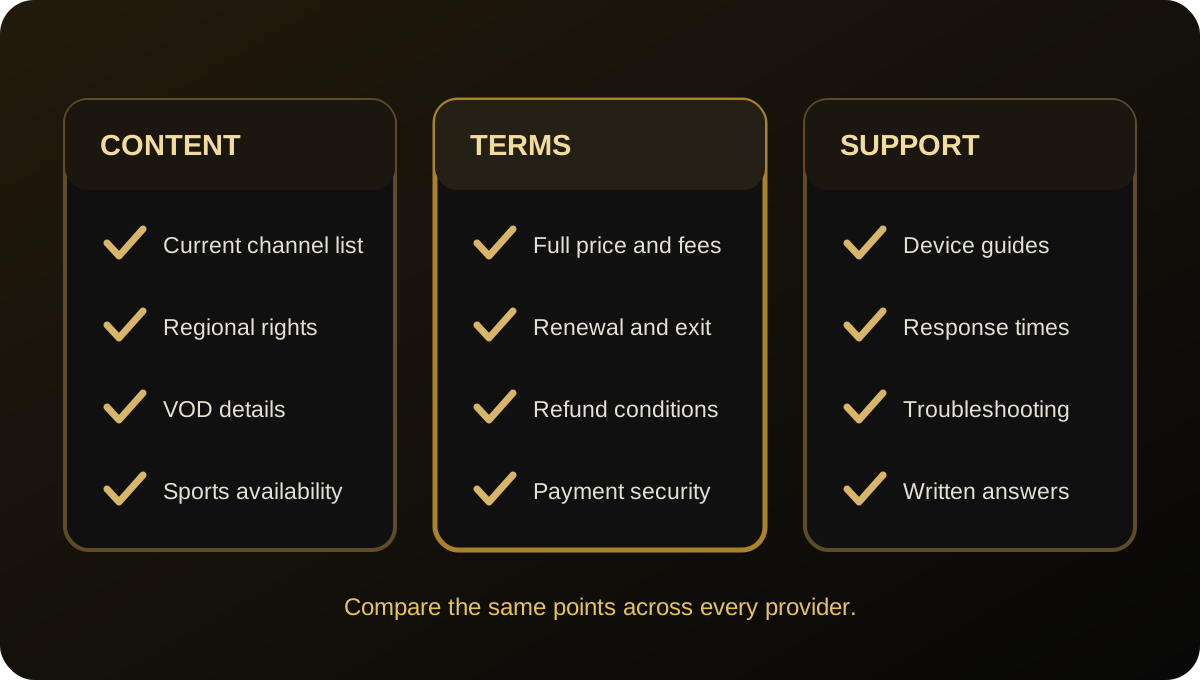
USA IPTV service checklist
- Request a current list of channels and on-demand titles available in your market.
- Verify distribution rights and the availability of any sports event you need.
- Compare total charges, billing currency, taxes, renewal and cancellation.
- Check the exact device, app and concurrent-stream limits.
- Review privacy and refund terms and test customer support before paying.
Frequently Asked Questions
How can I confirm my local US channels are included?
Ask for the exact local affiliate or feed for your area and verify the current channel guide. A national network name does not necessarily guarantee a local version.
Does “sports included” mean every local game is available?
No. Rights and regional restrictions can vary by league, event, season and location. Confirm the specific game or event before subscribing.
What should I compare besides the monthly price?
Check total billing period, renewal amount, taxes or fees, device compatibility, stream limits, refunds, cancellation rules, privacy and support.
Can I use a free IPTV player without a subscription?
A player may display compatible authorised sources, but installing it does not automatically provide channel access or rights to paid content.
What makes an IPTV service worth considering in the USA?
Clear authorization, an accurate channel list, support for your location and device, transparent pricing and written terms are more useful than a large unverified channel count. Check any local or sports requirements individually.
Are IPTV providers and IPTV player apps the same thing?
No. A player is software for playback; a content provider supplies the stream or subscription. A player app alone does not grant access to premium channels.
Can an IPTV subscription guarantee every live sporting event?
No general promise should be taken literally without a current rights and event list. Coverage can vary by league, season, region and broadcaster.
For current plan details, visit the View Pricing, read the FAQ or Contact Us. These links lead to Greadia’s main site pages; confirm any market-specific details with the team before ordering.